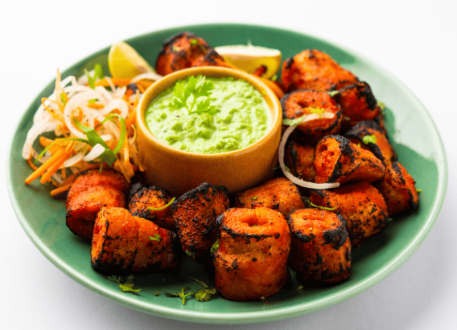
Paneer Tikka
Grilled paneer, peppers and mint chutney.
₹220
A clear, convenient way for every guest to explore your menu.
Give your guests an easier way to explore your menu with Menu Zyka's digital menu for restaurants. Whether you want to make a restaurant menu accessible online or design a menu that showcases your dishes clearly, Menu Zyka helps you present your offerings through a convenient QR menu experience.
Guests can scan your restaurant?s QR code using their smartphones to view menu categories, browse dishes and check prices?all without relying on printed menus that need frequent replacement.
Whether you run a dhaba, family restaurant, food truck or small food business, you can create an online menu that makes your offerings accessible to guests whenever they want to browse.
 Scan to view menuTable 08 · Sample
Grilled paneer, peppers and mint chutney.
₹220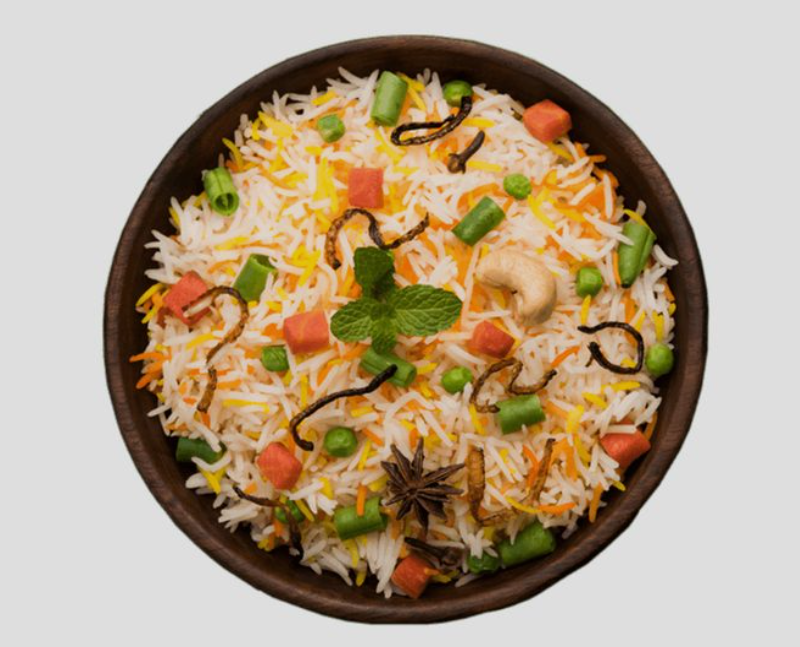
Aromatic rice with vegetables and spices.
₹200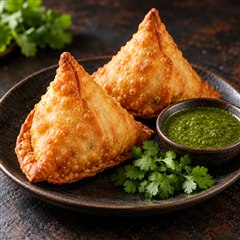
Crisp pastry with a spiced potato filling.
₹80Grilled paneer, peppers and mint chutney.
₹220Aromatic rice with vegetables and spices.
₹200Crisp pastry with a spiced potato filling.
₹80Illustrative menu · Sample dishes and prices
Printed menus can be difficult to maintain when dishes, prices or availability change. A digital menu for restaurants offers a flexible way for guests to browse directly from their smartphones.
With Menu Zyka, you can manage your menu digitally and give guests a convenient way to discover what your restaurant serves. Update supported menu information without having to replace printed copies every time something changes.
Whether you run a dhaba, family restaurant, food truck, or small food vendor, Menu Zyka helps you create a more organized digital dining experience with a restaurant QR code menu.
Prices change, new dishes are introduced, and certain items may no longer be available. Updating printed menus every time can require additional time and effort. A digital menu system offers a more flexible way to maintain your menu information.
Paper menus can become torn, stained, damaged or misplaced. Keeping every copy clean, readable and organized becomes an ongoing task for staff.
Restaurants with several tables need multiple copies. Keeping every copy aligned with the latest prices and available dishes can be inconvenient.
Guests often want to see what a dish looks like before choosing it. A digital restaurant menu can make browsing more visual through dish images, organized categories, and clearly displayed prices.
Give your dining tables an easy way to connect guests to your digital menu. With QR codes for restaurant tables, guests can scan a code using their smartphones to access your restaurant?s menu, reducing the need to distribute printed menus.
Your menu starts hereLet guests browse dishes, categories, prices, and available menu images from their own devices. Menu Zyka's QR menu for restaurants gives guests a convenient way to explore your offerings without handling a physical menu or installing a separate menu application, subject to your live product?s browser compatibility.
Grilled paneer, peppers and mint chutney.
₹220Aromatic rice with vegetables and spices.
₹200Crisp pastry with a spiced potato filling.
₹80Guests scan your restaurant QR code menu and explore your offerings on their smartphones, making access simple and convenient.
Reduce dependence on printed menus and the effort of keeping multiple copies updated. A practical alternative for small restaurants.
Update supported dish names, prices and categories as your offerings evolve. Menu image editing depends on the features available in your product setup.
Your restaurant menu, on your guest's phone.
Add dish names, categories, prices and available images to create your online restaurant menu.
Generate or assign table QR codes according to your setup. Place them where guests can easily scan them.
Guests open the menu in their smartphone browser, explore your offerings and communicate their order to the waiter.
Digital Menu is for browsing. Looking for direct QR ordering? Explore QR Ordering & Quick Service POS →
Present food offerings and prices digitally so customers can browse without relying entirely on printed copies.
Explore solutions for QR Menu for DhabasMake it easier for guests and families to explore dishes from their own smartphones at the table.
Explore solutions for QR Menu for Family RestaurantsDisplay your menu through a QR code so customers can check your offerings at the counter.
Explore solutions for QR Menu for Food TrucksCreate a more organized digital menu and make your offerings accessible in a smartphone-friendly format.
Explore solutions for Digital Menu for Small Food VendorsA QR menu is a digital version of a restaurant's menu that guests can access by scanning a QR code with their smartphone. It allows them to browse dishes, categories, prices and available images without relying on a printed menu.
The intended experience is for guests to open the digital menu in their smartphone browser after scanning the QR code, without installing a separate app. Browser and device compatibility can vary, so verify the experience with your live product before treating it as a guarantee.
The Digital Menu provides menu browsing. Direct digital ordering is a separate capability available through Menu Zyka's ordering solutions. With a browse-only menu setup, guests view the menu and communicate their order to the waiter.
Yes. Menu Zyka supports digital menu management, including changes to menu categories and prices. Menu images and other editing controls depend on the features available in your product setup.
Yes. Menu Zyka's Digital Menu is relevant to dhabas, family restaurants, food trucks and small food vendors looking for a convenient way to present their menus digitally.
Make your menu easier to access and simpler to maintain. Let guests explore your offerings through a digital QR menu while reducing your dependence on printed copies.
Grilled paneer, peppers and mint chutney.
₹220Aromatic rice with vegetables and spices.
₹200Crisp pastry with a spiced potato filling.
₹80Illustrative menu · Your branding, your dishes