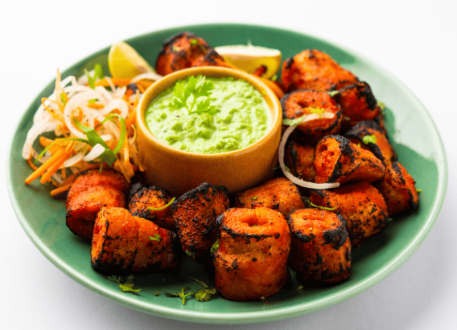
Paneer Tikka ▣
Soft paneer cubes marinated in spices and grilled to perfection.
Let guests scan, explore and choose. Keep your dishes, prices and availability up to date with Menu Zyka.
Explore the complete Menu Zyka workflow
Soft paneer cubes marinated in spices and grilled to perfection.
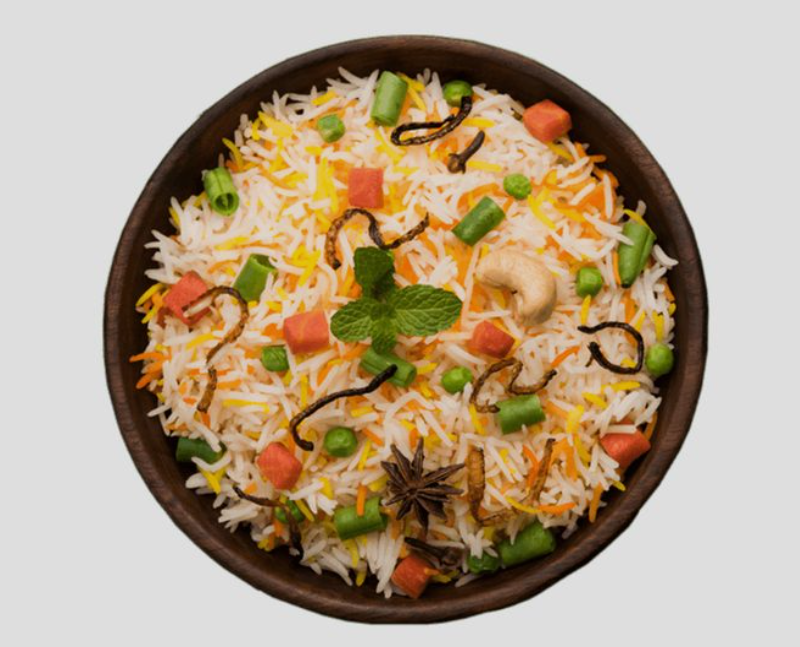
Aromatic basmati rice with vegetables, herbs and traditional spices.
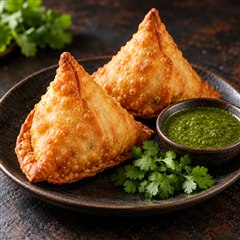
Crispy golden pastry filled with spiced potatoes and peas.
 Scan to view menu
Give your team a simpler way to manage menus, orders, kitchen communication and billing.
Every change can mean another printed menu.
More manual steps between guest and kitchen.
Important instructions can get lost in the rush.
The final step depends on information gathered across the service.
Connected tools for the way you serve.
Give every table a smarter digital menu.
Let guests order when they're ready.
Give your waiters a better way to take orders.
From table order to kitchen ticket—without the back-and-forth.
Restaurant POS and billing that keeps up with service.
Keep your menu current, your team connected and your restaurant ready for every guest.
Keep upcoming bookings organized and prepare for your next guests.
Schedule item specials by time and mark items available or unavailable in one click.
Bring incoming orders to one screen and keep your kitchen focused on what's next.
GST-enabled restaurant billing with the flexibility to split bills by item.
Get your business summary and export POS activity for reporting.
Your guests can view the menu in multiple languages.
Easily merge tables or transfer orders between tables in one click.
Stay informed as new orders and service requests arrive.
Bring your restaurant's operational workflow together—from order capture and KOT to billing and payment. Give your kitchen and billing teams clearer information during busy service.
Kitchen & billingSample dataKitchen noteLess spicy. Serve together.
Turn your restaurant data into clear, actionable insights.
Track collections, paid orders, average order value and cancellations from one dashboard.
Monitor sales across selected dates and quickly understand how your business is performing.
Review billing and order activity to keep your restaurant's performance in view.
Identify which menu items are driving orders and revenue.
Keep track of collected payments and understand your payment performance.
Monitor cancelled orders and their value to identify potential revenue leakage.
Business overviewSample dataPaneer Tikka24Veg Biryani18See your entire dining floor at a glance and stay in control of every table.
See which tables are available, occupied, awaiting billing or need attention.
Monitor your complete dining area from one centralized screen.
Quickly identify tables with new or pending orders.
Connect each table with its unique QR code for a seamless digital ordering experience.
Know when tables need service, billing or resetting so your team can act faster.
Manage table activity without switching between multiple screens or processes.
Digital Floor MasterSample dataFrom a simple QR menu to connected table service. Choose the tools that fit how you run your restaurant.
Simple QR menu for restaurants
A beautiful menu in every guest's pocket. Update it whenever your menu changes.
Fast billing with printed KOT
Keep the counter moving, from the first item to the final bill.
QR ordering + counter billing + KOT
Let guests order by QR while your team stays in control of the counter and kitchen.
Waiter ordering + table management
Give your floor team a clear view of every table, order and bill.
QR table ordering + waiter POS
Bring guests, waiters and the kitchen together in one connected dining experience.
Useful capabilities across the Menu Zyka range. Choose a product to see what's included.
Quick menu upload, easy edits and one-click availability. Keep your menu as fresh as your food.
Multilingual menus help guests discover dishes in a language they're comfortable with.
Coordinate table transfers and kitchen order tickets. Schedule dishes for the times you serve them.
See peak hours, best-selling dishes and sales reports to plan your next service with confidence.
A simple path for your guests. A clearer workflow for your team.
Try it: add a dish, place a demo order, prepare it in Kitchen KOT, then open Billing.
Your orders, tables and sales in one view.
Your demo orders appear here as soon as you place them.
Move a ticket from New to Preparing to Ready.
Choose an order and record a simulated payment.
Best-selling dishes, busiest hours and payment mix.
Add categories, dishes, descriptions and prices.
Organize the restaurant and its table details.
Make the menu easy to reach at every table.
Connect guest orders to your kitchen workflow.
Find the Menu Zyka workflow that fits the way you serve.
Start with the menu. Grow into a connected service.
₹199
per month, billed annually
₹599
per month, billed annually
Let's talk
QR ordering, counter billing and kitchen tickets
Let's talk
waiter ordering and table management
Let's talk
QR table ordering with connected waiter service
Monthly prices are billed annually. Confirm taxes, trial terms and any additional requirements before purchase.
Compare the plans →Got Questions? We've Got Answers! Explore Our FAQs Below.
Menu Zyka offers five products: Digital Menu for QR menu browsing; POS Billing for staff-entered orders, billing and printed KOT; QR Ordering & Quick Service POS for QR and staff ordering; Dine-In POS for waiter and table workflows; and Smart Dine-In POS for QR table ordering with connected waiter service. Compare the plans or ask our team to help you choose.
No. Guests scan the restaurant QR code and open the menu in their phone browser. They do not need to download an app to browse dishes and prices.
Yes. You can edit your menu from the restaurant admin panel. Availability controls and scheduled items depend on your product. Your printed QR code continues to work as long as its menu link stays the same.
Digital Menu is for browsing only. QR Ordering & Quick Service POS adds customer and staff ordering, while Smart Dine-In POS supports QR table ordering alongside waiter service. Choose the product that matches your ordering workflow.
Yes. Dine-In POS and Smart Dine-In POS support waiter ordering and table workflows. Kitchen tickets and display options depend on the selected product; POS Billing includes printed KOT. Our team can confirm the setup for your restaurant.
The restaurant admin panel is available in Kannada, Hindi and English. This language option is for restaurant staff; it does not currently mean the customer-facing menu is available in those languages.
The Digital Menu and POS Billing prices shown on this website are monthly equivalents billed annually. POS Billing starts from ₹599; pricing for the other three products is discussed according to your requirements. Confirm taxes, hardware, payment setup and any additional charges with our team.
Use Start free trial or the enquiry form to share your restaurant details. Our team can discuss the product, setup and applicable trial terms. You can also explore the interactive website demo, which uses sample data and does not send real orders or payments.
Products with reporting provide insights into orders, sales and item performance. Available reports depend on your product and recorded activity. Ask for a guided demo to review best-selling items, peak hours and payment summaries for your needs.
Let's make everyday service a little simpler.
Tell us about your restaurant and your business needs. Our team will help you find the right. Simply fill out the form on the left with your business details, and our team will get in touch with you.
Share a few details to start the conversation.